


Table of Contents

You’ve heard the terms RGB and CMYK, but do you know what they mean? These two color modes are behind every design, and sometimes the culprit of color mismatches. This may be the result of a lack of knowledge about the essential differences between them. This article is for both seasoned designers and amateur first-time artists. It covers essential topics about RGB vs CMYK, explaining their essence, when and how to use them, and helps you understand the distinctions so you can confidently choose the right color mode and get stunning results.
Key Takeaways
- The biggest differences between RGB and CMYK include what designs they’re used for, the mixing mode, and maximum color yield.
- Use RGB if your final destination is a digital screen, such as a computer, smartphone, smartwatch, or camera.
- Use CMYK for physical printing, such as stationery, business cards, customized signs, stickers, posters, T-shirts, branded apparel, or promotional items.
- There are cases when colors look different during the design process. You should know how to correctly convert between RGB and CMYK when using Photoshop, Illustrator, and InDesign to recreate an exact match of your previous version.
What Is RGB
RGB stands for red, green, and blue as its primary colors. It’s an additive color mode that uses light to create color, combining these three hues in various proportions to produce a broad spectrum of shades. RGB is the proper default for screens and digital displays.
How RGB Works
RGB uses light to define color. The colors are produced through light projected on a dark background. RGB is used in digital projects because screens rely on red, green, and blue subpixels that emit light at varying intensities to display color. When all three colors reach their full intensity, they combine to produce white light. When none of them are active, the result is pure black.
Characteristics of RGB Colors
The process of blending light at different intensities is known as additive mixing. Through it, you can achieve up to 16.7 million distinct color combinations. In the light spectrum, colors are additive, and RGB uses this color mode. The constituent colors of RGB are red, green, and blue. Each of them can be adjusted across 256 levels of brightness, from 0 to 255. RGB has a wider color gamut than CMYK, so most print colors translate well to screen, though some highly saturated ones may look slightly different. On the other hand, RGB can produce neon and ultra-vivid colors that ink simply can't replicate.
Common RGB Use Cases
RGB is the right mode for anything that lives on a screen. This includes web and app design elements like icons, buttons, and graphics, as well as branding assets such as online logos and digital ads. Social media content also falls under RGB, whether that's images for posts, profile pictures, or background visuals. Any visual content you create for digital platforms should always be designed in RGB mode.

What is CMYK
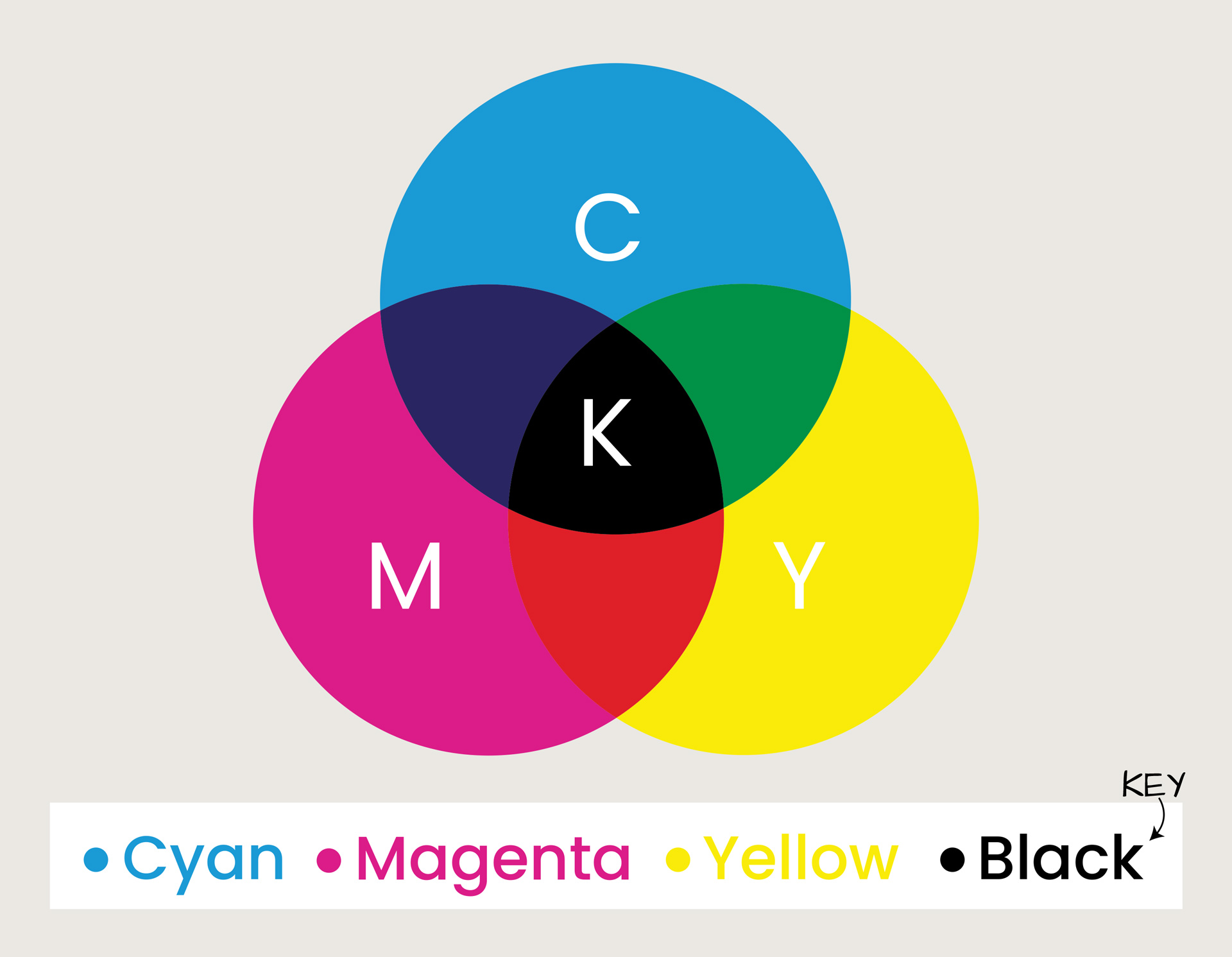
CMYK stands for cyan, magenta, yellow, and black. CMYK has a more restricted color range that can all be printed. In contrast to RGB, which represents additive colors, CMYK is based on subtractive colors.
How CMYK Works
These colors work through pigments, which are substances that soak up certain wavelengths of light and bounce the remaining ones back to your eyes. Each color in CMYK absorbs a specific band of light rather than reflecting it. Cyan takes in red light, magenta absorbs green, and yellow intercepts blue. Together, they form the foundation of all color reproduction in print.
Characteristics of CMYK Colors
Since CMYK is based on ink percentages, each channel can range from 0% to 100%, which theoretically allows for a very large number of combinations. In whole numbers, CMYK gives 101 possible values per channel, resulting in approximately 104 million possible combinations. However, and this is important, having more theoretical combinations doesn't mean a wider color range. Many of those CMYK combinations produce very similar or identical colors, and CMYK can't replicate the bright neons and vivid saturated colors that RGB displays on screen. So while CMYK technically has more numerical combinations than RGB, RGB still wins in terms of color, vibrancy, and range.
Common CMYK Use Cases
CMYK is the standard color model for physical printing. You can use them to reproduce high-quality images on paper, packaging, and signage. Its main use involves commercial, office, and home printing. Marketing and promotional materials, such as brochures, posters, business cards, flyers, and stationery, like letterheads, envelopes, and magazines, all fall into the list. Beyond these, CMYK is widely used in apparel printing on items like T-shirts and mugs, promotional products such as pens, and fine arts and publishing, covering books, art prints, and photographs.
RGB vs CMYK: What are the Main Differences
The key difference between RGB and CMYK comes down to where and how your design will be used. If you want to have a digital design, choose RGB. As for physical printing, choose CMYK. See the table below to understand the mechanisms behind RGB vs CMYK:
| Feature | RGB | CMYK |
|---|---|---|
| What it's for | Screens and digital designs | Printed products |
| Where you see it | Phones, laptops, websites | Physical branding and tactile products |
| How colors work | Light on a screen | Ink on paper, fabric, and more |
| How it looks | Vibrant, screen-optimized | True-to-print accuracy |
| Color range (gamut) | Wider range of colors | Narrower, print-safe range |
| Best time to use | Designing and previewing | Print-ready files |
CMYK vs RGB for Printing: Which Should You Use?
When it comes to the question of whether to choose CMYK or RGB for printing, CMYK is the way to go. Printers work by layering the ink colors CMYK consists of, which are cyan, magenta, yellow, and black, to recreate your design on paper. When your file is in CMYK, the printer knows precisely how much of each ink to use. So if it’s about printing, always use CMYK.
An important question arises: what happens if you print an RGB file? Most printers will automatically convert it to CMYK, but that automatic conversion is where things go wrong. RGB has a much wider color range than CMYK, so some of those vivid screen colors can't be recreated with ink. The easiest way to avoid all of this is to switch your file to CMYK before you start designing.
As a one-stop printing company, we produce all our designs using CMYK color mode.
How to Check Color Mode
RGB and CMYK aren’t interchangeable. As mentioned above, printing an RGB file instead of converting it to CMYK can lead to some interesting results, and not in a good way. It’s always a good idea to check your color mode with whatever design software you’re using.
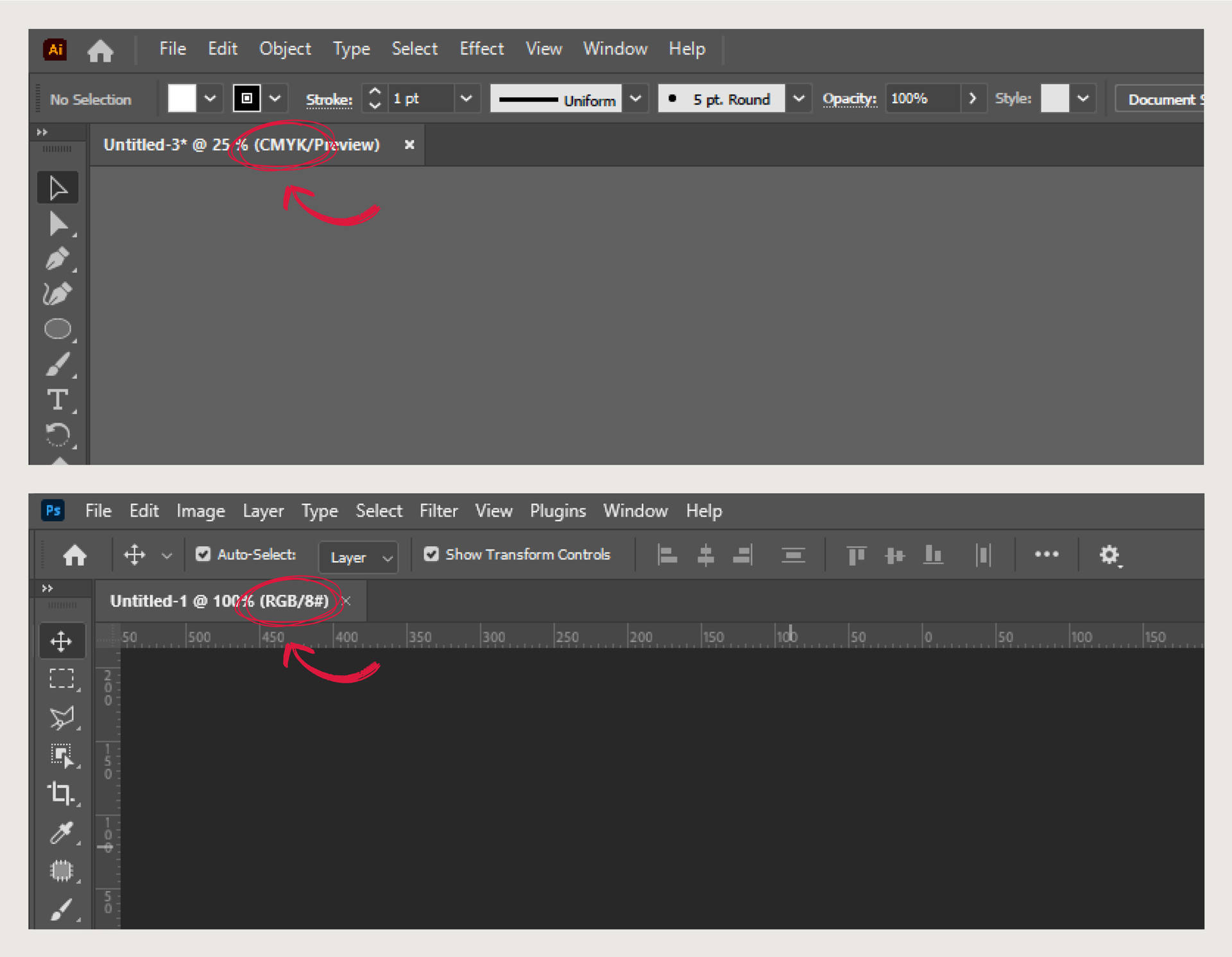
Whether you’re working with Photoshop or Illustrator, checking your file is a piece of cake. Once you open your file, the color mode will show up right in the title bar at the top of your screen.
How to Convert RGB to CMYK
You may ask yourself: “Do I need to convert RGB to CMYK for printing?” Converting from RGB to CMYK is simpler than it sounds, and you’re better off doing it before you complete your designs.
In Photoshop, go to Image in the top menu, select Mode, and choose the color mode.

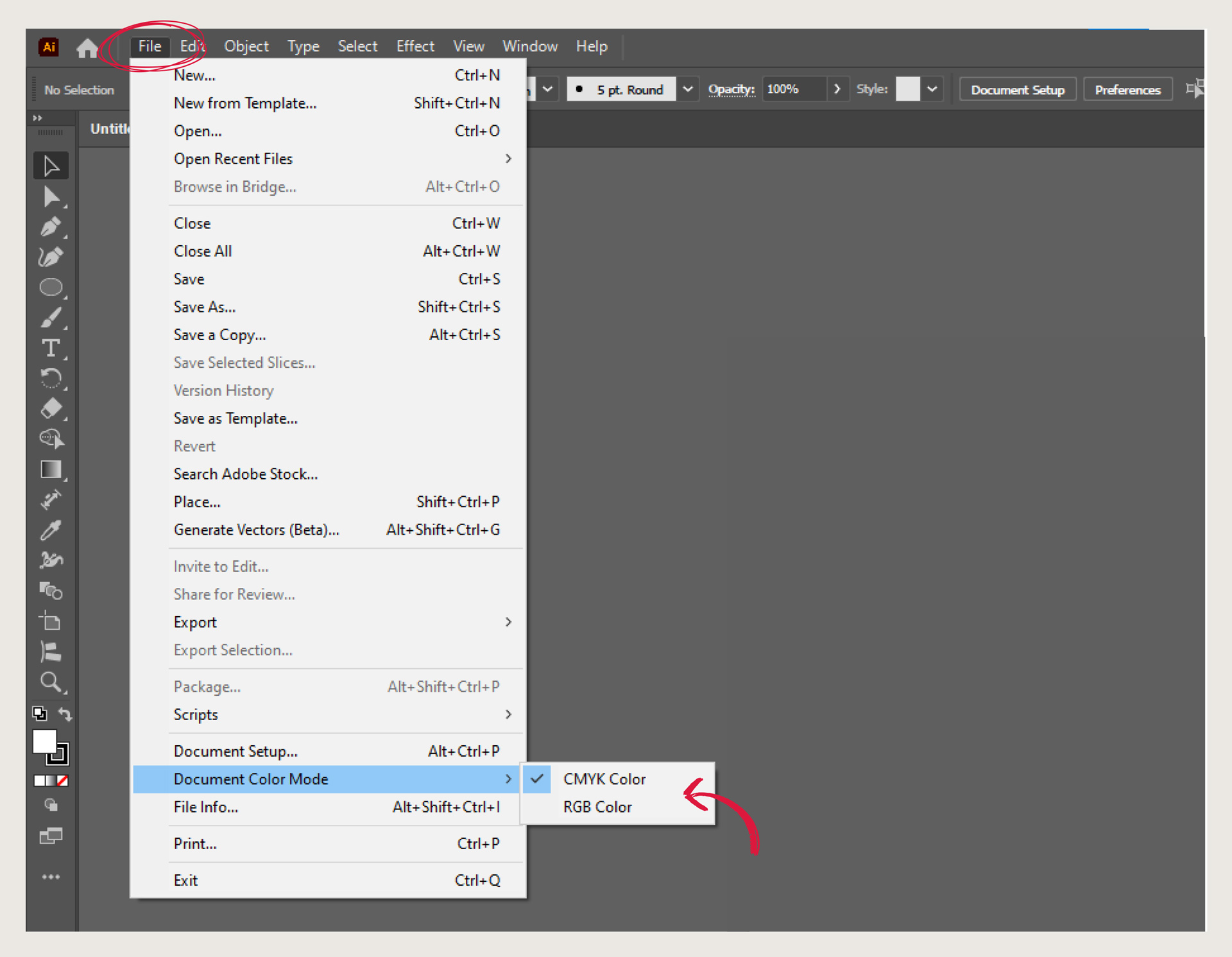
In Illustrator, go to File, hover over Document Color Mode, and select CMYK Color or RGB Color from the submenu.
For software other than Photoshop or Illustrator, you can use one of the many free online conversion tools available to get the job done.
How to Ensure Color Accuracy for Your Printed Products
Get the most accurate colors for your printed files by designing them in CMYK. If you start in RGB and switch at the end, some colors may shift. Try to set your screen to a normal brightness level so you get a truer view of how your colors will look in reality when printed. Screens that are too bright can make colors look more vivid than they really are.
Most design tools also have a feature that lets you preview how your design will look when printed. Use it. It is one of the best ways to spot color issues before you print your file.
Read our guide on printing methods and how to use them.
Choose the Best Color Modes for Your Designs
Knowing when to use RGB vs CMYK is one of the most useful things you can learn as someone who designs artwork. A golden rule to remember is that RGB is for screens, CMYK is for print.
Use RGB when your design is going to live on a screen. Use CMYK when your design is heading to print. If you need more assistance with a product you want to print, you’re always welcome to contact our specialists.
FAQs
What’s the difference between CMYK and RGB?
The difference between these two color modes is that CMYK is used for printed products, while RGB is used for on-screen visuals.
How many colors are in RGB compared to CMYK?
RGB can display around 16.7 million colors. It reaches that number because each of the three channels, red, green, and blue, has 256 possible values, and 256 x 256 x 256 gives you 16.7 million possible color combinations.
CMYK, on the other hand, can reproduce around 104 million theoretical color combinations, but that does not mean it has a wider color range. Many of those combinations produce very similar or identical colors, and CMYK cannot replicate the bright, vivid, neon colors that RGB displays on screen. So, RGB still wins in terms of color vibrancy and range.
Is CMYK better for printing?
Yes, CMYK is the recommended mode for printers. This is because printers work with ink, and the inks they use correspond to the CMYK colors. So, when you send your file in CMYK for printing, the printer already knows how much of each ink to use to get your colors right.
Do you print in CMYK or RGB?
As an online sign maker, we use CMYK for printing. It is the color mode that printers work in, and sending your file in CMYK means your colors will match your design (taking into consideration some minor differences between the color you see on your screen and the ones you print).
What happens if you print RGB instead of CMYK?
Printing an RGB file is technically possible, but the outcome is not always reliable. When you send an RGB file to a printer, the printer converts it to CMYK first, and that conversion happens automatically without any input from you. The problem is that RGB has a much wider color range than CMYK, so some of the colors in your design simply do not have a direct CMYK match. The printer just picks the closest ink color, and that is not always close enough.
Do printers automatically convert RGB to CMYK?
Yes, most modern printers will automatically convert RGB to CMYK if you send them an RGB file. The printer has no way of knowing what your design is supposed to look like. Converting your file to CMYK yourself before sending it to print is always the safer choice.
Can I convert RGB to CMYK without losing quality?
Yes, you can convert RGB to CMYK without losing much quality, but almost always expect some minor color shift. Remember that you are moving from a wider color range to a smaller one. The best way to avoid color mismatches is to convert your design from the get-go.
You Might Also Be Interested In

